
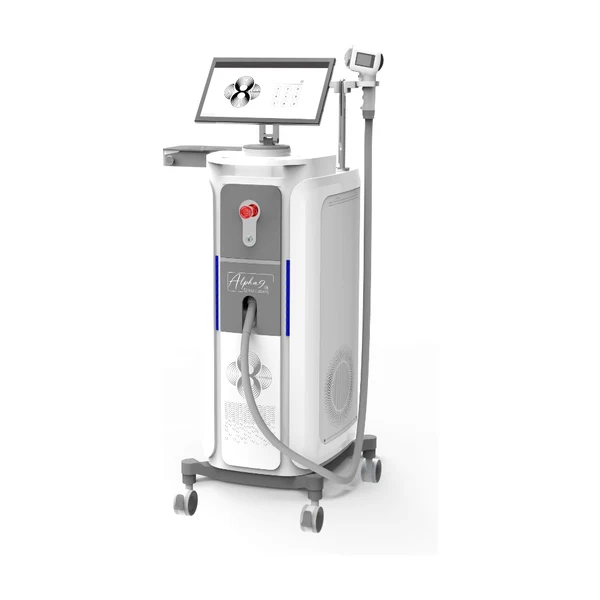
Professional laser maintenance: a daily and periodic checklist

A professional laser is the engine of your business, and like any engine it repays whoever looks after it. A properly maintained device works for years without downtime; a neglected one stops "unexpectedly" at the least convenient moment, when the diary is full of clients. In this article we have put together a practical maintenance checklist: what to do daily, weekly and periodically so that the equipment serves you for a long time and the warranty stays valid.
One important note before we start: the maintenance requirements for your particular model are always set out in the manufacturer's documentation supplied with the device — our technician goes through everything in person during installation, and the user manual stays with you. This article is general good practice, which supplements the manual rather than replacing it.
The golden rule: maintenance starts at installation
The first and most important rule applies before the very first treatment: a professional device must be assembled and commissioned by a specialist. That is the standard procedure with us — a technician comes, assembles the device, checks every system and trains you to look after it, and the EU declaration of conformity that fixes the start of the warranty is handed over at the same time. Opening the packaging and connecting the device yourself is not permitted — it puts both the equipment and the warranty at risk. The whole process is described on the page "How working together goes".
The daily checklist
These take only a few minutes at the start and end of the day:
- Cleaning the handpiece window. After every client, wipe gel residue off the sapphire window with a soft, non-scratching cloth — a clean window ensures even transmission of energy and even cooling (we explain why that matters in our article on cooling);
- A visual check of the handpiece and cable. Cracks, damaged insulation or a chipped window are reasons to stop work and call us;
- Checking the temperature readings. Before the first treatment, make sure the device has reached its working values and is showing no warnings;
- Hygiene of the work area. Use appropriate products for disinfecting surfaces, such as Descoderm; clean the device's housing only with products the manufacturer permits;
- Shutting down properly. At the end of the day switch the device off as the instructions say — not at the socket, but through the intended shutdown procedure, which lets the cooling system complete its cycle.
The weekly rhythm
- Checking the ventilation openings. Dust is the silent enemy of cooling; make sure the openings are clear and that there is enough space around the device for air to circulate;
- Checking the water level. Check and top up the water level in the cooling circuit as the manual directs;
- Stock check. Look over your supply of gel, gloves, razors and other single-use items — you always run out at the worst possible moment;
- Condition of the protective eyewear. Check that the practitioner's and the client's eyewear (eye shields) are unscratched and in good order — this is a safety matter, not a comfort one.
Periodic maintenance
- Changing the water in the cooling circuit. Done periodically to the manufacturer's schedule — use only the specified type of water;
- Replacing the water filter. The filter protects the circuit from deposits; keep a spare so that replacing it never causes downtime;
- A preventive service inspection. A periodic check by a specialist catches wear before it becomes a fault — contact us about scheduling;
- Reviewing software and settings. If the device reports updates or a need for recalibration, do not skip them.
What never to do
- Do not open the housing yourself — there are no user-serviceable parts inside, and opening it is dangerous and voids the warranty;
- Do not work through warning signals "because clients are waiting" — a short pause is always cheaper than a serious fault;
- Do not use random cleaning products, the wrong water or non-original consumables;
- Do not transport the device unprepared — ask us about the correct procedure before moving it.
Maintenance and your business numbers
Maintenance is not bureaucracy but business economics, directly. One day of downtime with a full diary costs hundreds of euros in lost income (check your own figure with the calculator), and the cost to your reputation from cancelled appointments is greater still. A tidy routine, a spare filter on the shelf and a fast service contact turn those risks into manageable ones. That is precisely why the reality of a supplier's service is one of the most important criteria when evaluating equipment offers.
An annual maintenance calendar
So that the routine does not get lost in daily work, put it in the calendar — here is a sample annual plan to adapt to how intensively you work and to what your user manual says:
| Interval | Tasks |
|---|---|
| Daily | Cleaning the window, visual check, checking readings, proper shutdown |
| Weekly | Ventilation, water level, stock check, condition of eyewear |
| Monthly | Deeper cleaning of the housing, checking cables and connections, restocking |
| Quarterly | Servicing the water circuit, assessing or replacing the filter |
| Annually | Preventive service inspection, calibration check, preparing for the summer season |
A tip from practice: record maintenance in a log (a simple notebook or spreadsheet will do) — date, task, notes. Such a log not only imposes discipline but helps a service engineer greatly if diagnostics are ever needed.
The most common sources of trouble, and how to avoid them
In service practice most call-outs come from a few recurring causes — and almost all of them are preventable:
- Overheating. Cause number one: blocked ventilation, a neglected water circuit, a hot room. The answer is the cooling routine and a filter changed on time;
- Damage to the handpiece. Drops, kinked cables, a scratched window — the handpiece is the most delicate part of the device; it needs its own place and careful handling;
- The wrong products. Aggressive cleaners or the wrong water in the circuit — the damage accumulates quietly and shows up suddenly;
- Tinkering. Do-it-yourself repairs and unauthorised helpers are the fastest way to lose both the device and the warranty.
Stock planning: what should always be on the shelf
Downtime often comes not from faults but from simply running out. A minimum list worth keeping in stock at all times:
- a spare water filter — so a replacement never has to wait for a delivery;
- at least a month's supply of gel;
- a reserve of single-use items: gloves, razors, spatulas;
- spare sets of client eye protection.
The easiest way to order is on the back of your weekly stock check — everything in one place in our catalogue, dispatched within one to two working days.
When to call service immediately
Some situations leave no room for experiment — stop work and call at once if:
- the device shows an error that is not in the user manual, or the error repeats after a restart;
- you notice traces of liquid near the device or the handpiece;
- there is an unusual sound or smell, or the sensation of the pulse has noticeably changed;
- the handpiece window or cable is damaged.
For our clients the rule is simple: better one unnecessary call than one ruined treatment. Our contact details are always to hand — here.
Three maintenance myths
- "A new device doesn't need maintenance." It does — from day one. The daily routine is a habit, and it is easiest to form straight away rather than after the first warning on the screen;
- "If it works, don't touch it." A device can go on "working" with a half-blocked filter — its working life just shortens and client comfort suffers. Prevention is always cheaper than reaction;
- "Maintenance takes too much time." In reality the daily routine is five minutes and the weekly one fifteen. Compare that with a single day of downtime and the arithmetic becomes obvious.
Moving premises? How to transport the device safely
A move is one of the riskiest moments in a device's life. The main rules:
- Contact us in advance — we will advise on preparing your particular model: the water circuit, securing the handpieces, packing;
- Transport the handpieces separately, softly packed — they are the most delicate part;
- Protect against cold and impact — a device with a water circuit cannot sit waiting in a cold car in winter;
- Do not connect it immediately in the new place — let the device reach room temperature, check the electrical supply, and for a full check it is worth calling out our technician, especially if you have moved a long way.
A well-planned move costs one day; a badly planned one can cost a repair and a week of downtime.
The essentials at a glance
- The daily routine is five minutes: window, visual check, readings, proper shutdown;
- Most faults start with overheating — cooling maintenance matters most;
- A spare filter and a reserve of consumables on the shelf are the cheapest insurance against downtime;
- A maintenance log imposes discipline and helps service;
- When in doubt, call: a question is always cheaper than an experiment with expensive equipment.
Frequently asked questions
How long does a professional diode laser last?
Diode modules have a long pulse life, so a properly maintained device serves for many years. What shortens that life most is overheating — which makes cooling maintenance the most important part of the routine.
Can I change the water filter myself?
Yes — it is a user-level procedure and we show you how during training and installation. What matters is using the right filter and following the sequence in the user manual.
What happens to the warranty if a "friend who fixes things" repairs the device?
Unauthorised repair voids the warranty. As direct representatives of the manufacturer we provide service during and after the warranty period — always contact us first.
Where can the correct daily routine be learned?
In the training included in the price of a device: alongside treatment technique it covers equipment maintenance. Everything is then in the user manual, and if questions come up, call us.
Do maintenance requirements differ between devices?
The principles are the same — a clean window, a healthy water circuit, ventilation — but the intervals and the specific procedures are described in each model's user manual. During installation the technician shows you the routine for your own device, so use the list in this article as a framework and the manual as the final authority.
What should be done with the device during a longer break?
Before a longer break, carry out the full cleaning routine, check the water circuit and leave the device in a dry, cool room out of direct sun. Do not start work the moment you return — let the device reach room temperature and check the readings. If the break was long, a preventive inspection before the season is worthwhile.
Maintenance is a habit formed in the first weeks of work that then serves for the device's whole life: five minutes in the morning today means a calm diary tomorrow.
Who should be responsible for maintenance when several practitioners work together?
Best practice is one responsible person and a shared log: the daily routine is done by whichever practitioner is working, while the weekly and periodic tasks are overseen by a designated person. That avoids the classic "I thought my colleague had done it". Teach new staff the maintenance procedure alongside treatment technique — it is just as much part of the job.
Preparing to buy equipment and want to understand its full life cycle? Start with the guide "How to choose a professional hair removal laser" or get a consultation — we will tell you what maintenance looks like day to day. And to our clients, one more reminder: the support line exists for exactly this — call before a problem becomes downtime. The number is always the same, +370 620 66666, and you will not be waiting long for an answer.